SAM.gov registrations expire every 12 months — and a lapsed registration makes you ineligible for contract awards and federal payments until you renew. Most businesses don't lose their registration through any complicated failure; they simply forget to renew on time. This guide covers when to renew, what the SAM renewal process involves, what happens if your registration lapses, and how to reactivate an Inactive record.
For the complete SAM.gov registration reference — UEI, CAGE code, entity validation, and Reps & Certs — see the SAM.gov registration guide for small businesses. New to federal contracting? Start with federal contracting for beginners.
On this page Jump to section
SAM Renewal: Quick Answer
SAM.gov registrations must be renewed once every 12 months to maintain Active status. The renewal process involves reviewing and reconfirming your entity information — legal name, address, NAICS codes, Reps & Certs, and banking details — and resubmitting. If your registration lapses, your status becomes Inactive and you are no longer eligible for awards or payments until renewal is complete.
Why SAM Renewal Exists and What It Covers
SAM.gov requires annual renewal to ensure vendor records remain accurate and current. Federal agencies use SAM data as the foundation for award and payment processing — outdated records create compliance issues, payment delays, and eligibility problems that affect both vendors and contracting offices.
Renewal is not a re-registration from scratch. If your information hasn't changed, it is largely a review-and-confirm workflow. If information has changed — legal name, address, banking, ownership status — those updates are made during renewal, and in some cases may trigger a new entity validation check.
What renewal covers
- Legal entity details — business name, physical address, entity type, EIN
- NAICS codes — primary and secondary codes that determine how buyers find you
- Representations & Certifications — your compliance declarations, business size, ownership status
- EFT banking details — routing number, account number, account holder name for federal payments
- Points of contact — administrative and business contacts associated with your entity record
Active vs Inactive vs Expired: What Each Status Means
Your SAM registration status determines what you are eligible to do in federal procurement. Understanding what each status means — and what triggers a change — is essential for keeping your pipeline moving.
Entity record is valid and complete. Eligible for new awards, payments, and entity searches.
Expiration date has passed without renewal. Entity record exists but is not eligible for new awards or payments.
Treated as Inactive in practice. Reactivation requires completing the renewal process.
What Inactive status means in practice for your business:
- Contracting officers cannot make new awards to an Inactive entity — it is a hard stop in the award process
- Federal payments on active contracts may be disrupted
- Your entity record is not deleted — it remains in SAM.gov and can be reactivated through the renewal workflow
- You do not lose your UEI or CAGE code — those identifiers persist through an Inactive period
For a complete reference on all SAM status types and what triggers each one, see SAM status meanings: Active, Inactive, Expired.
Step-by-Step SAM Renewal Process
The renewal process follows the same structure as your original registration review. Work through each section carefully — do not just click through without reading. Information that was accurate at initial registration may have changed, and outdated Reps & Certs or banking details create downstream problems.
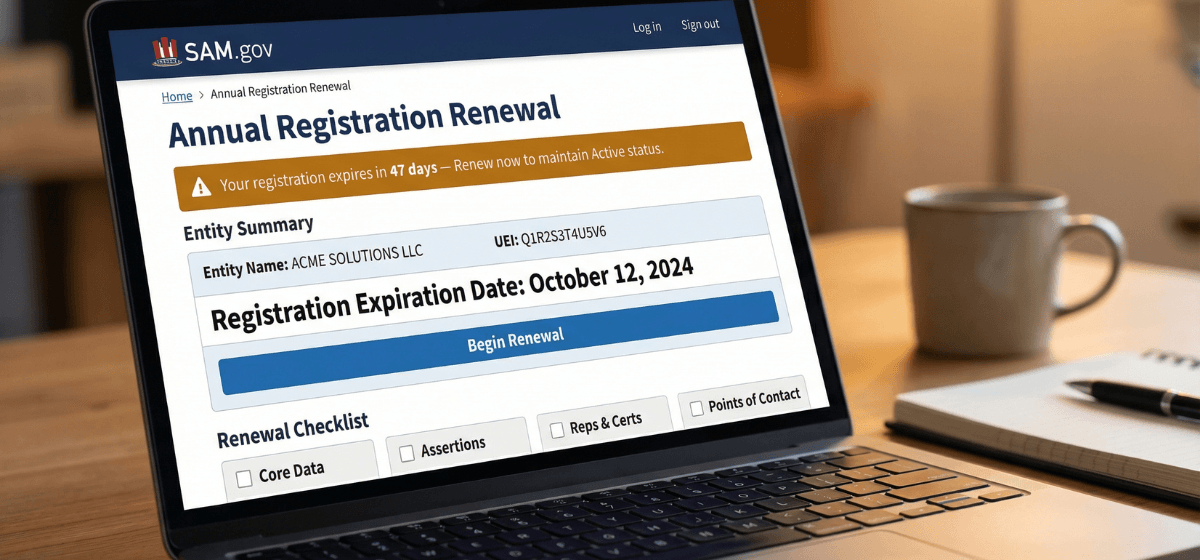
- Sign in at sam.gov using your Login.gov credentials
- Navigate to your Workspace and open your entity record
- Locate your registration expiration date — it is displayed in your entity summary
- SAM.gov opens the renewal window 60 days before expiration — begin as soon as it opens
If you have lost access to the Login.gov account tied to your SAM registration, resolve that first. Account access issues are one of the most common reasons renewals are completed late.
- Confirm your legal business name exactly matches your current IRS EIN records
- Confirm your physical address matches your official business records
- If your name or address has changed since your last registration, update your IRS records first, then update SAM.gov to match
- Changed information may trigger entity validation — allow extra time if updates are needed
- Confirm your primary NAICS code still reflects your core offering — your business may have evolved since initial registration
- Add secondary codes for capabilities you have developed
- Remove codes that no longer apply — overstuffing NAICS codes reduces relevance
- Your NAICS codes directly determine whether contracting officers find you in SAM.gov searches
Your Representations & Certifications are compliance declarations. Business status, ownership structure, size classification, and other compliance factors may have changed since your last registration. Review each section carefully and update where needed. For guidance on what each section covers and what you are agreeing to, see Reps & Certs explained.
- Verify routing number, account number, and account holder name are current
- If your banking has changed since your last registration, update it now
- Confirm the account holder name matches your business banking records exactly
- Save confirmation details for your finance team
- Submit the renewal after reviewing all sections
- Monitor your entity record — confirm your registration status returns to Active and your expiration date has updated
- If entity validation is triggered due to changed information, respond to any document requests promptly
- Calendar your next renewal reminder immediately — 60 days before your new expiration date
What Happens If Your SAM Registration Lapses
If you are reading this because your registration is already Inactive or Expired, here is what you need to know: your entity record still exists, your UEI and CAGE code are intact, and reactivation follows the same process as standard renewal.
Reactivation steps
- Log in to SAM.gov at sam.gov using your Login.gov credentials
- Navigate to your entity record — it will show Inactive or Expired status
- Begin the renewal workflow — the process is the same as a standard annual renewal
- Review and update all sections: legal details, NAICS, Reps & Certs, banking
- Submit and monitor status — if information has changed, entity validation may be triggered
- Once Active status is confirmed, verify your new expiration date and set your next renewal reminder
If you have active contracts
If your SAM registration lapses while you have active federal contracts, contact your Contracting Officer Representative (COR) promptly. Payment disruptions on active contracts require direct communication with your contracting office — they need to know you are aware of the lapse and actively working to resolve it. Do not wait for them to reach out to you.
If reactivation triggers entity validation issues, see entity validation in SAM.gov: why it fails and how to fix it for the full resolution workflow.
SAM Renewal Best Practices
Build these habits into your operations
Frequently Asked Questions About SAM Renewal
How often do I need to renew my SAM registration?
SAM.gov registrations must be renewed once every 12 months. Your expiration date is visible in your entity record. SAM.gov may send reminder emails as your expiration approaches, but do not rely solely on those — set your own calendar reminder 60 days before your expiration date.
What happens if my SAM registration expires?
Your registration status changes to Inactive. You are no longer eligible for new contract awards or federal payments until you complete renewal and your status returns to Active. Your entity record is not deleted — it remains in SAM.gov and can be reactivated through the standard renewal process. Your UEI and CAGE code are unaffected.
How long does SAM renewal take?
If your information hasn't changed, renewal can be confirmed relatively quickly after submission. If information has changed — particularly legal name or address — entity validation may be triggered, which can add time. Starting 60 days before expiration gives you adequate buffer for any issues that arise.
Is SAM renewal free?
Yes. SAM.gov renewal is completely free through the official SAM.gov website. Any service charging a fee to renew your registration is offering optional paid assistance — payment is not required. Be alert to phishing emails and services that claim renewal fees are mandatory.
Can I renew early — before my 60-day window?
SAM.gov opens the renewal window 60 days before your expiration date. You can begin the renewal process as soon as that window opens. Completing renewal early does not shorten your registration period — your new expiration date is calculated from your current expiration date, not from when you submit the renewal.
Don't let a missed renewal cost you an opportunity.
A lapsed SAM registration is one of the most preventable problems in federal contracting — and one of the most disruptive when it happens at the wrong moment. If you want help keeping your registration current, accurate, and optimized for buyer visibility, the done-for-you service covers the full process. Or book a strategy call to talk through your specific renewal situation.
Author: Biz2Gov Editorial Team · Reviewed by: Former DoD Contracting Officer advisor · Sources: SAM.gov entity registration, SAM.gov help